
MyFitnessPal is the biggest calorie and nutrition tracker there is. It counts your food, macros, and weight better than anything. Its progress photos, though, are basic: a simple side-by-side, no automatic alignment, no time-lapse, and they're stored in your MyFitnessPal account. Use MyFitnessPal to track what you eat.
Body Tracker does the photo side. It aligns every shot automatically, compares any two with a slider or overlay, turns them into a time-lapse, and keeps them on your phone with no account. Use it to see your body change.
We tested both MyFitnessPal and Body Tracker on progress photos: adding them, comparing them over time, and checking where they're stored. MyFitnessPal is a calorie and nutrition tracker with a progress-photo feature. Body Tracker is a dedicated progress-photo app. This compares them on progress photos, weight, privacy, and price.
MyFitnessPal vs Body Tracker at a glance
| MyFitnessPal | Body Tracker | |
|---|---|---|
| Best for | Counting calories and macros | Seeing your body change |
| Standout feature | Huge food database + nutrition tracking | Automatic alignment + time-lapse |
| Pricing | Free; Premium $19.99/mo or $79.99/yr | Free trial; paid plans from $4.99/month |
| Photo alignment | ❌ | ✅ Fully automatic, on-device |
| Before/after compare | ✅ Static side-by-side | ✅ Draggable split + opacity overlay |
| Time-lapse video | ❌ | ✅ MP4, on-device |
| Import old photos | ❌ | ✅ Keeps each photo's original date |
| Organize | ❌ | ✅ 4 body areas, 3 angles |
| Photos storage | Cloud account | On-device, no account |
| Calorie & food tracking | ✅ Huge food database | ❌ |
| Body measurements | ✅ Weight + neck/waist/hips | ❌ Weight only |
| Cross-device sync | ✅ | ❌ On-device only |
MyFitnessPal: Calorie tracking giant
Platform: iOS, Android & web · Price: Free, with Premium subscription
What MyFitnessPal does well
MyFitnessPal is the most popular nutrition app there is, with 2.3 million US App Store ratings at 4.7 stars. Its food database is enormous, so logging meals, macros, and calories is fast, and it tracks your weight and a few measurements (neck, waist, hips) alongside. It also has progress photos: a private gallery where you can compare two shots side by side and share them if you want. For understanding what you eat and holding a calorie target, nothing matches it, across iPhone, Android, and web.
What MyFitnessPal's photos can't do
- No automatic alignment. Photos aren't lined up for you, so framing drifts between shots.
- Static side-by-side only. Two photos next to each other, with no slider or opacity overlay to compare them closely.
- No time-lapse. Photos stay a gallery of stills, with no video of your change.
- Photos live in your account. They're stored in the MyFitnessPal cloud, not kept only on your device.
- Photos are a side feature. They hang off weight check-ins, with no workflow built around body areas and angles.
Body Tracker: Built for progress photos
Platform: iOS & Android · Price: 14-day free trial, then Pro subscription
What Body Tracker adds
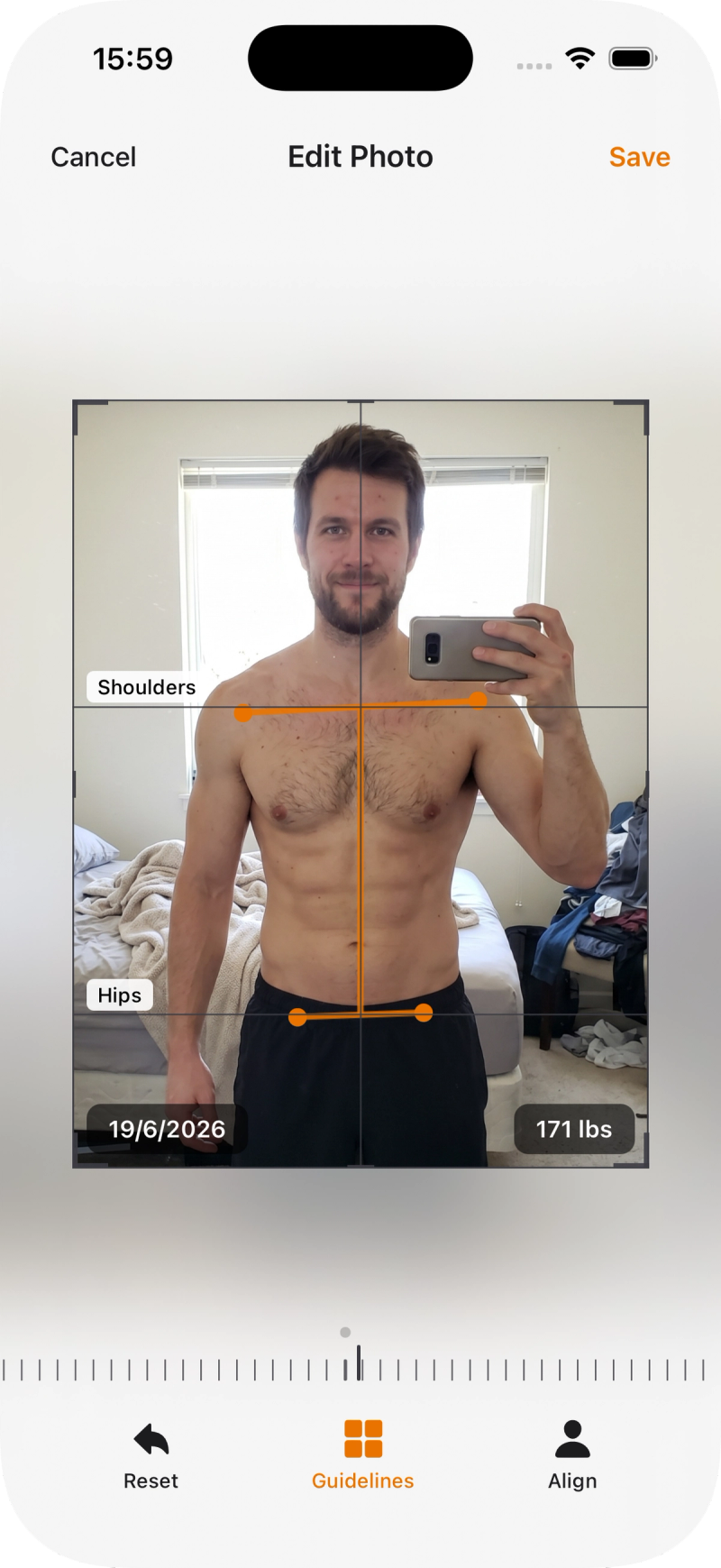
Body Tracker does only the photo side, and builds it out fully. You take a photo and it aligns automatically, so every shot is framed the same. You compare any two with a draggable split or an opacity overlay, turn a series into a time-lapse video, and everything stays on your device with no account. It's built for one job: seeing your body change over weeks and months.
Every photo lines up on its own
Take the photo and Body Tracker's on-device AI rotates, zooms, and centers it to match the rest of the series, with no grid or ghost image to line up with. Weeks later it pays off: because every shot is framed the same, your before/after reads as real change, not a change in camera angle.
Spot the small changes
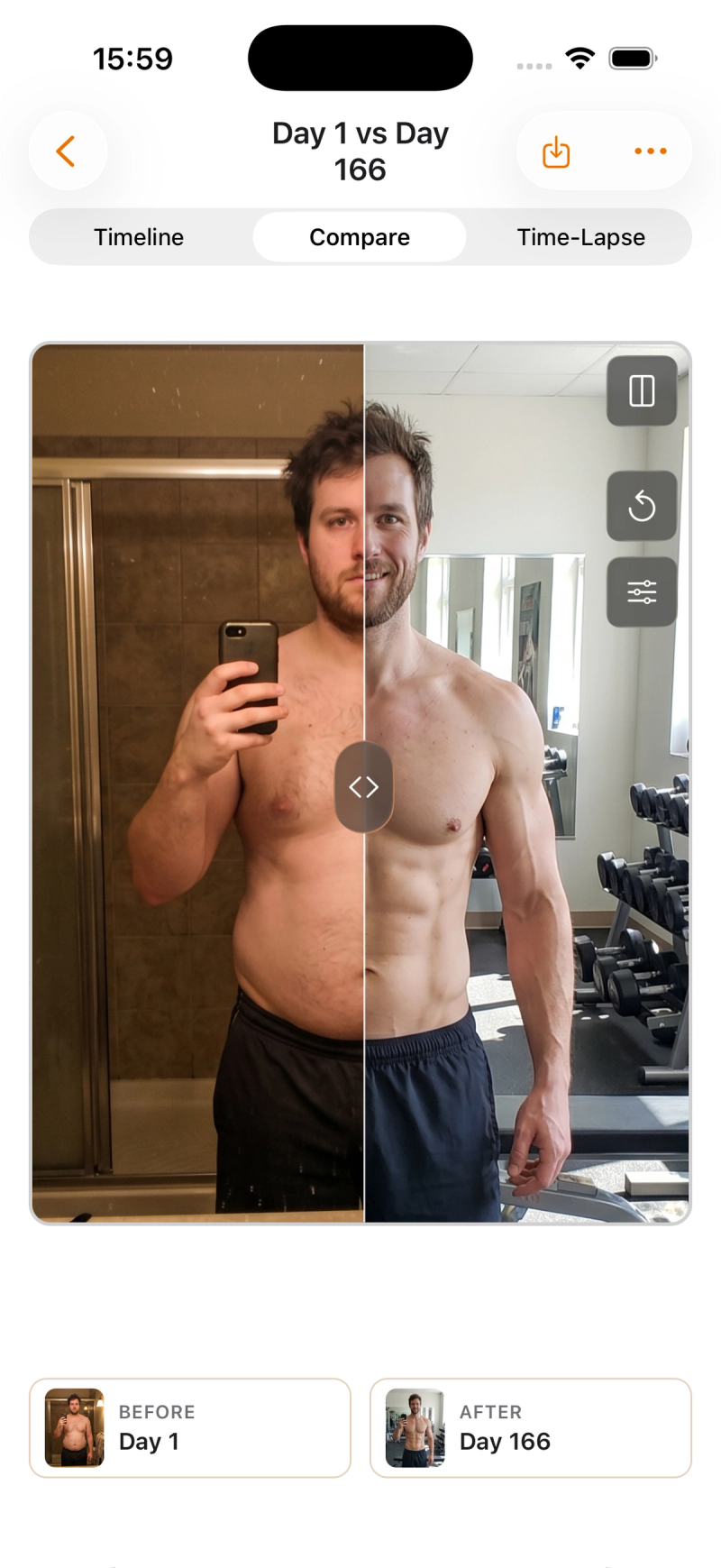
Put any two photos together in a split view with a divider you drag across them, or fade one over the other with an opacity overlay. It's how you catch the small stuff, a little more definition or a slightly smaller waist, that a static side-by-side hides.
Where Body Tracker falls short
Body Tracker only handles photos and weight. It won't count calories or track macros, and it doesn't have MyFitnessPal's food database or nutrition tools, so it isn't a diet app. There's no permanent free tier either: after a 14-day trial it's $4.99/month or $29.99/year. And because everything stays on your device, there's no cross-device sync, so your photos live on the one phone.
Which should you choose?
Choose MyFitnessPal if:
Your focus is food. MyFitnessPal counts calories and macros better than anything, tracks your weight, and its built-in photo gallery is enough if you only want the occasional side-by-side.
Choose Body Tracker if:
You care about seeing the visual change and want your photos to actually line up.
- Your before/afters never match because the framing drifts.
- You want a real compare (split and overlay) and a time-lapse, not a static pair.
- You want your photos to stay on your device with no account.
Choose both if:
- MyFitnessPal handles the diet: calories, macros, and your weight trend.
- Body Tracker turns your photos into an aligned, comparable, time-lapse record of the result.
Frequently Asked Questions
Yes. It has a private photo gallery where you can compare two shots side by side and share them if you want. It doesn't align photos automatically or make a time-lapse.
There's a 14-day free trial, then $4.99/month or $29.99/year (varies by region). No permanent free tier.
In your MyFitnessPal account (cloud). They're private by default and aren't saved to your camera roll unless you export them.
They stay on your device. No account, no cloud. (MyFitnessPal keeps photos private too, but stores them in your MyFitnessPal account.)
Yes. Track your food and weight in MyFitnessPal, and keep your progress photos in Body Tracker for alignment, compare, and time-lapse.
No. Progress photos and weight only. For calories and macros, use MyFitnessPal.